

XMAX
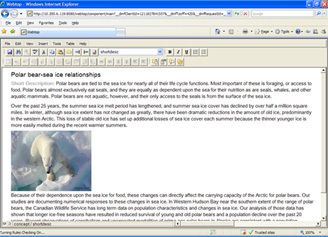
Integrate structured authoring capabilities for deployment across the enterprise.XMetaL® XMAX is an embeddable ActiveX component designed for developers to integrate into custom environments. Use XMAX wherever you need to create a lightweight, easy-to-use XML editor that you can deploy without the IT overhead of desktop installers— many global companies rely on thin-client XMAX-based components tightly integrated with dynamic web publishing systems, content management systems, customer relationship management systems, and other critical business applications.
For detailed information on customizing the XMAX, please check
- XMetaL Customization Guide (pdf) or Microsoft HTML Help (chm) format
- XMetaL Programmer’s Guide (pdf) or Microsoft HTML Help (chm) format
- XMetaL Technical information
Key Benefits
- Can be deployed in thin-client applications to make structured content more widely accessible with minimal IT costs
- Empower non-technical contributors to create richly structured content, with minimal learning curve
- Tightly integrate XML authoring capabilities into custom workflow applications and web publishing systems
- Flexible concurrent-user licensing model allows users at different levels to view or edit XML content at any time, without needing to install a bulky desktop-based editor
Highlights of New Features in XMetaL XMAX 20.0
- Embedded CTM Editor and enhanced Styling Assistant
The CTM Editor, now integrated into the XMAX, enables users to view, modify, and customize a wide range of element-based behaviors and properties for a specific Active Document DTD or schema. These settings may originate from XMetaL Developer or may be automatically generated.
The Styling Assistant Editor allows users to refine the visual appearance of selected elements in the active document, including font family, size, style, weight, color, decoration, background, alignment, display, and whitespace.
Together, the CTM Editor and the enhanced Styling Assistant enable XMAX customization developers to efficiently tailor the editing environment to their specific requirements.
These features can also be made available to end users if the corresponding XMAX APIs are exposed within the XMAX container application.
- Updated support of integration XMAX with Microsoft Edge
XMEdge is an ActiveX control that implements the subset of Microsoft Edge WebView2 interfaces necessary for loading and rendering web content. It additionally enables a bidirectional communication channel between the Microsoft Edge (Chromium) V8 JavaScript engine and the XMAX JScript engine (Microsoft’s implementation of ECMAScript/JavaScript).
As part of XMAX customization, XMEdge controls can be embedded directly into XML documents or incorporated into XFT form dialogs, with behavior managed through XMAX customization scripts. Both XFT Form controls and XMEdge controls are included in the XMAX installation and can be reused across any XMAX-based application.
The integration enables developers to extend XMAX customization capabilities, including the following areas:
- MathML Support
MathML (Mathematical Markup Language) is an XML-based standard developed by the W3C for representing mathematical notation and its structure. It provides a consistent, platform-independent way to embed mathematical expressions directly within documents and web content.
- Integration with Leading AI Assistants
Developers can integrate XMAX with major AI technologies, including xAI’s Grok, High-Flyer’s DeepSeek, OpenAI’s ChatGPT, Microsoft’s Copilot, and Google’s Gemini, to enhance automation, content generation, and intelligent assistance within the document environment.
- Advanced Web-Based User Interface Dialogs
Support for Chromium-based UI components allows the creation of modern, responsive dialogs and interactive elements for enhanced user experiences.
For additional information or implementation guidance, please contact XMetaL Customer Support.
- MathML Support
- New API
The XMAX _Document interface has been extended with additional methods and properties that provide access to specific internal states of a document. These enhancements include access to the Undo/Redo command stack and counters, the document change counter, and any ActiveX controls embedded within the document.
- XMAX Core Enhancements
XMetaL binaries have been updated to ensure seamless integration with the latest Windows SDKs and Visual Studio development tools, providing full compatibility with recent updates to Windows 10 and 11.
- Various customer feature requests and defect fixes are addressed.
For detailed information on new features, please check
Feature Highlights
Securely Access Content from Across the Enterprise
- Deploy over a network in thin-client applications, typically running in an Internet Explorer web browser or custom purpose-built application.
Efficient Client Deployment
- Provide valid XML content creation capabilities for any situation by embedding XMAX for use in any application supporting ActiveX.
Solid XML Authoring, High Usability
- Work in a familiar word-processing interface while hiding the complexity of the underlying XML. XMAX includes ready-built features and XMAX can be configured to display parts or all of document using interactive forms, to make it even easier to capture information that fits naturally into forms.
- The chameleon-like flexibility of XMAX makes it an ideal platform for delivering a minimal set of commands tailored to the needs of your users. XMAX-based applications can make XML authoring usable by everyone, even non-technical contributors, with virtually no XML learning curve.
Change Tracking
- XMAX enables teams to collaborate efficiently with a familiar revision-marking feature. View revisions with color-coding, then accept or reject them with a button-click.
Standards-Based Development Platform
- XMAX, as a native XML editor, can be used with any DTD or XML Schema, including custom schemas. Developers will appreciate how easy it is to customize XMAX by using standard scripting languages and CSS.